Links
AI / Agents
Developers
Community
dash-mantine-datatable
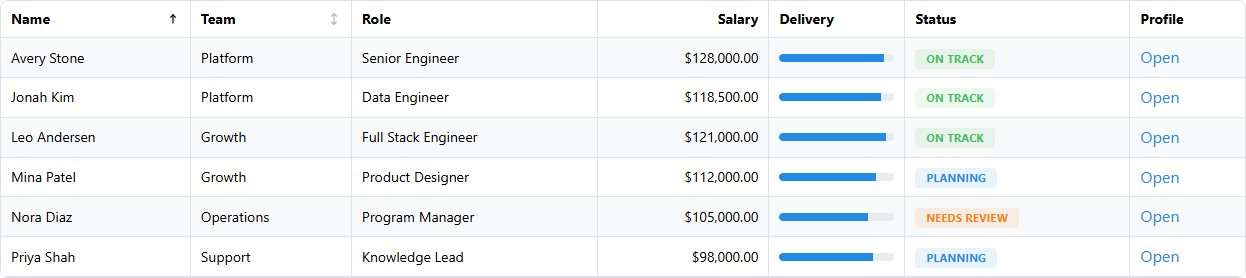
dash-mantine-datatable is a Dash wrapper around Mantine DataTable for apps that already use dash-mantine-components and want a table that feels native to the Mantine stack. It adds a Dash-friendly prop model, Mantine style props, Dash-safe render and editor slots, and chainable Python helpers for columns, grouping, rows, selection, pagination, sorting, and search.
Install
pip install dash-mantine-datatableInstall the optional demo dependency bundle when you want to run the live market-data examples from usage.py:
pip install "dash-mantine-datatable[demo]"Quick Start
from dash import Dash
import dash_mantine_components as dmc
import dash_mantine_datatable as dmdt

app = Dash()

app.layout = dmc.MantineProvider(
    dmdt.DataTable(
        id="employees",
        data=[
            {"id": 1, "name": "Avery Stone", "team": "Platform", "status": "On Track"},
            {"id": 2, "name": "Mina Patel", "team": "Growth", "status": "Planning"},
        ],
        columns=[
            {"accessor": "name", "sortable": True},
            {"accessor": "team", "sortable": True},
            {"accessor": "status", "presentation": "badge"},
        ],
    ).update_layout(radius="lg", withTableBorder=True, striped=True)
)

if __name__ == "__main__":
    app.run(debug=True)
Highlights
- Mantine-flavored Dash props such as
radius,bg,classNames,styles,bd, andbdrs - Chainable helpers including
update_layout(),update_table_properties(),update_columns(),group_columns(),update_rows(),update_selection(),update_pagination(),update_sorting(), andupdate_search() - Dash-safe component templates for column renderers, editors, filters, empty states, custom loaders, row expansion content, and sort icons
- Support for grouped headers, grouped rows, nested child rows, row dragging, server-side pagination, server-side sorting, server-side search, and selector-based row styling rules
- Multi-language Dash component assets for Python, R, and Julia generated from the same source tree
Compared With dash-ag-grid
The comparison below reflects this package’s current 0.1.0 surface and the official Dash AG Grid docs as of April 17, 2026.
| Area | dash-mantine-datatable |
dash-ag-grid |
|---|---|---|
| UI fit | Best when the rest of the app is already Mantine/DMC and visual consistency matters | Best when the grid is its own major product surface and can use AG Grid’s theme/system |
| Authoring model | Compact Dash API with Python helpers like update_columns() and update_rows() |
Richer but more verbose grid configuration with AG Grid concepts and options |
| Styling | Mantine props, Mantine tokens, Dash components in table slots | AG Grid theme system plus extensive cell, row, header, and menu customization |
| Dash component slots | Strong support for Dash components in renderers, editors, filters, empty states, loaders, and row expansion | Strong custom rendering and editing support, with a broader grid API around it |
| Common app-table features | Sorting, search, selection, pagination, row expansion, row dragging, grouped headers, conditional row rules | All of the above plus a much broader spreadsheet-style feature set |
| Grouping and hierarchy | Inline row grouping, aggregations, grouped headers, nested child rows | Broader grouping/tree/master-detail model; some advanced features are enterprise-only |
| Large-data strategy | Client and server modes for pagination, sorting, and search; no AG Grid-style row-model surface exposed | Client-side, infinite, viewport, and server-side row models |
| Export and clipboard workflows | Not a current focus of the package surface | Mature CSV/export/clipboard workflows and more Excel-like interactions |
| Analytics features | Focused on application tables, formatting, and interaction | Pivoting, advanced aggregation, charts, sidebars, and other grid-heavy workflows; many advanced features are enterprise-only |
| Licensing story | MIT package built on the Mantine DataTable ecosystem | Core grid is free; advanced AG Grid features may require an Enterprise license |
| Best fit | Dash apps that want a polished Mantine-native table without AG Grid complexity | Data-heavy apps that need deep grid mechanics, very large-data tooling, or enterprise spreadsheet features |
Choose dash-mantine-datatable when you want the table to feel like the rest of a Mantine app and you value a smaller Dash-native API. Choose dash-ag-grid when the grid itself is the power-user surface and you need row models, export, pivoting, or other spreadsheet-grade features.
Helper Example
table = (
    dmdt.DataTable(
        data=[{"id": 1, "name": "Avery", "salary": 128000, "status": "On Track"}],
        columns=[
            dmdt.Column("name"),
            dmdt.Column("salary", textAlign="right", presentation="currency", currency="USD"),
            dmdt.Column("status", presentation="badge"),
        ],
    )
    .update_columns(selector="name", title="Employee")
    .update_rows(selector={"status": "On Track"}, className="row-ok")
    .update_selection(selectionTrigger="checkbox")
    .update_pagination(recordsPerPage=10)
)
Documentation
Build the Great Docs site locally:
python -m pip install -e ".[docs]"
quarto --version  # requires Quarto 1.5.0 or newer
python scripts/build_docs.py
This regenerates the recipe pages from usage.py, builds the Great Docs site, and copies the rendered output to site/. Great Docs also generates llms.txt, llms-full.txt, Markdown page copies, and the API reference from the public Python exports.
On Windows, great-docs installs JupyterLab assets with very long filenames. If python -m pip install -e ".[docs]" fails under a deeply nested venv path, either enable Windows Long Paths or create the virtual environment in a shorter directory such as C:\venvs\dmdt.
py -m venv C:\venvs\dmdt
C:\venvs\dmdt\Scripts\Activate.ps1
Set-Location C:\Users\galli\Documents\GitHub\Repositories\dash-mantine-datatable
python -m pip install -U pip
python -m pip install -e ".[docs]"
To enable deployment on GitHub, open Settings -> Pages and set the publishing source to GitHub Actions.
Local Development
npm install --legacy-peer-deps
python -m pip install -r requirements.txt -r tests/requirements.txt
npm run build
python -m pytest
python usage.py
Publishing
.\scripts\check-release.ps1python scripts/check_release.pyUse staging as the integration branch for contributor PRs, then open a release PR from staging into main when you are ready to publish. The release PR title is the source of truth for the next package version, so title it like v0.1.1 Release - Improved Documentation and reduced console warnings.
The release guard validates that:
- the PR is
staging -> main - the title starts with
vX.Y.Z Release - the requested version is newer than the current package version
When that release PR is merged, .github/workflows/publish-release.yml will:
- stamp the requested version into
package.json,package-lock.json,dash_mantine_datatable/package-info.json, andProject.toml - promote
## UnreleasedinCHANGELOG.mdinto## X.Y.Z - YYYY-MM-DDor, if needed, create a release section from the title summary - commit those release metadata changes back to
main - rebuild, test, package, upload to PyPI, and create or update a GitHub release
Recommended changelog flow:
- Keep a
## Unreleasedsection at the top ofCHANGELOG.mdonstaging. - Add release notes there as contributors land changes.
- Let the publish workflow convert that section into the final versioned entry.
One-time GitHub setup:
- Create a long-lived
stagingbranch. - Protect
mainso changes land by pull request, not direct push. - Require the
Release PR Guardworkflow onmain. - Add a
PYPI_API_TOKENsecret to thepypienvironment used by the publish workflow.